

Is It Safe to Buy Discounted Electronics Online?
Table of Contents
- Why Discounted Electronics Attract Risk
- How to Spot Fake Electronics Websites
- Refurbished vs. New Electronics: Pros and Cons
- Safe Payment Methods for Online Shopping
- Consumer Protection Rights for Online Purchases
- Steps to Verify Your Purchase After Arrival
- Buying Discounted Electronics Safely: Your Action Plan
- Conclusion
Last Updated: August 25, 2026
Why Discounted Electronics Attract Risk
When buying discounted electronics online, you're entering territory where legitimate deals collide with sophisticated fraud. The appeal is obvious: saving 50% on a laptop or smartphone feels like a win. But that same appeal attracts bad actors who've built operations around exploiting budget-conscious shoppers.

Refurbished products, open-box returns, and clearance inventory are real categories with real value. The problem is that counterfeit goods, stolen merchandise, and outright scams hide within those same channels. A buyer without verification skills can't tell the difference until it's too late.
The barrier to entry for creating a fake storefront has never been lower. A fraudulent retailer can launch a professional-looking website, copy product descriptions from legitimate sites, and disappear after collecting payment. By the time you realize the item isn't what was promised, they're already gone.
At TDR Shopper, customers can navigate this landscape successfully by understanding what separates safe discounted electronics purchases from dangerous ones. The difference comes down to verification: knowing how to spot red flags, understanding what legitimate discounts actually look like, and taking post-purchase steps to confirm what you've bought is genuine.
How to Spot Fake Electronics Websites
Fraudulent retailers often reveal themselves through visual and structural inconsistencies that legitimate businesses avoid. Learning to recognize these patterns is your first line of defense when evaluating whether it's safe to buy discounted electronics online from an unfamiliar seller.
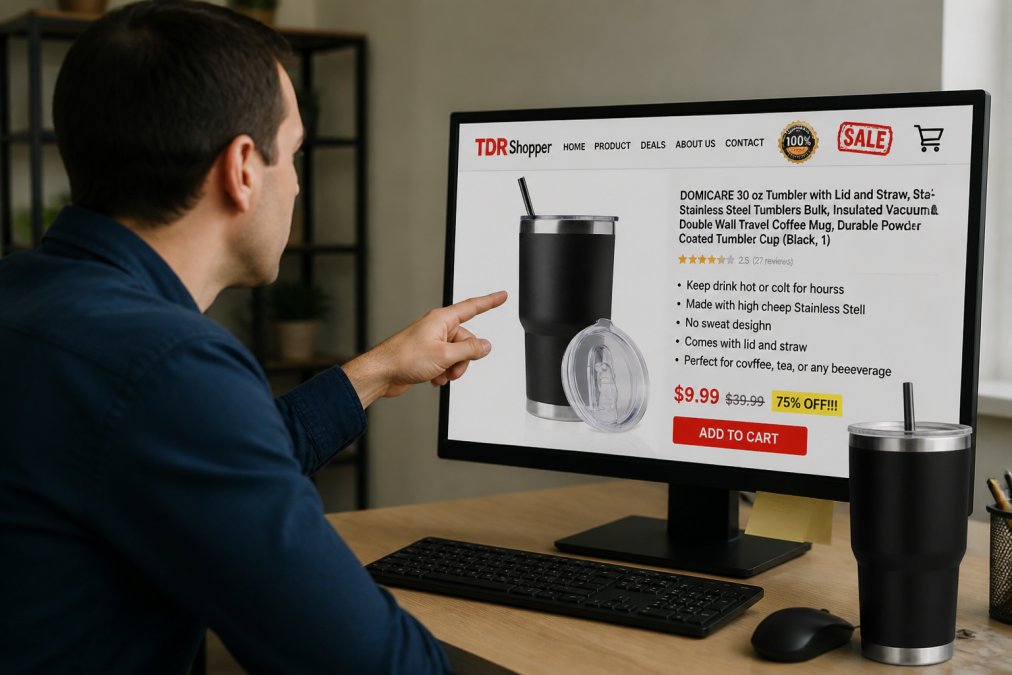
Red Flags That Signal a Fraudulent Retailer
A legitimate electronics retailer invests in their online presence because it's their storefront. Fraudulent sites often cut corners in obvious ways.
Look for broken links and pages that don't load properly. Real businesses fix these issues because they cost sales. Check whether the site has an SSL certificate by looking for the padlock icon in your browser's address bar. Legitimate retailers encrypt customer data as a baseline security measure.
Examine product photography closely. Authentic retailers photograph their own inventory or license professional images. Counterfeit sites frequently copy images directly from manufacturer websites, sometimes with watermarks still visible. If you see the exact same product photo on three different websites with different seller names, that's a major red flag.
Read the website copy for spelling and grammar errors. Professional retailers employ editors or use spell-check. Consistent misspellings and awkward phrasing suggest the site was hastily assembled by someone not invested in legitimacy.
Check the domain name itself. Scammers often use domains that closely mimic legitimate retailers: "Amaz0n.com" instead of "Amazon.com." Take five seconds to verify the exact spelling matches the real company.
Examine their contact information. Legitimate retailers provide multiple ways to reach them: phone numbers with real customer service, physical business addresses, and email support. Fraudulent sites often list only a contact form with no phone number or address.
Verifying Seller Reputation and Legitimacy
Before committing to a purchase, dig into the seller's track record.
Start with third-party review platforms like Trustpilot, the Better Business Bureau, and Google Reviews. Read recent reviews carefully and look for patterns in complaints. Pay special attention to how the seller responds to complaints. Legitimate businesses address concerns; scammers ignore them.
Search the company name plus "scam" or "fraud" in Google. This often surfaces warning threads on Reddit or consumer protection forums where people post real experiences.
Verify the seller's authorization status for brand-name products. Major manufacturers like Apple, Sony, and Dell maintain lists of authorized resellers on their websites. If a seller claims to sell brand-new products at deep discounts but doesn't appear on the manufacturer's authorized retailer list, that's suspicious.
Check whether the site displays verified security badges like Norton Secured or McAfee Secure. These require verification to display, though scammers sometimes fake them.
Refurbished vs. New Electronics: Pros and Cons
Understanding what you're actually buying is essential when shopping for discounted electronics online. The category you're buying from determines what protections and risks apply.
What Refurbished Actually Means
Refurbished electronics have been returned, repaired, and tested to work like new. The term itself is legitimate, but quality varies significantly depending on who did the refurbishing.
Manufacturer refurbished products come from the original maker or an authorized service center. These items typically failed initial quality control, were returned by customers, or had minor defects. The manufacturer repairs them, runs diagnostics, and certifies they meet original specifications. These carry the strongest warranty protections and represent the safest refurbished purchase.
Third-party refurbished products come from independent refurbishers who buy used or returned electronics and repair them. Quality depends entirely on the refurbisher's standards. When a product is labeled "refurbished" without specifying the refurbisher, assume it's third-party and verify the warranty coverage before buying.
Open-Box and Clearance Electronics
Open-box items are products that were purchased and opened but never used. These typically sell at 15-30% discounts because retailers can't sell them as new once the box is opened. You're buying a genuinely new product, just without the sealed box. However, you may lose any manufacturer warranty contingent on purchasing a sealed product. Check the seller's warranty policy before buying.
Clearance electronics are stock the retailer needs to move quickly, often because newer models have arrived or the product is being discontinued. These are typically new, unused products at discounts reflecting the seller's need to clear inventory. Clearance items usually retain manufacturer warranty coverage.
The risk profile for open-box and clearance is lower than refurbished because you're buying new products. The main risk is warranty coverage.
Technical Verification of Refurbished Hardware
When you buy refurbished electronics, verify the seller's claims through technical diagnostics after arrival.
Battery health is the first indicator for refurbished devices. Lithium batteries degrade with charge cycles. For smartphones and laptops, check battery health immediately upon arrival (peer-reviewed research). On iPhones, this appears in Settings > Battery > Battery Health & Charging. On Android devices, use apps like AccuBattery. Expect 80-90% battery health on quality refurbished devices; anything below 70% indicates heavy use or poor maintenance.

Run a full diagnostic on the device. Windows devices have the Windows Memory Diagnostic and Disk Check utilities; Mac devices have Disk Utility. These tests reveal hardware failures that aren't obvious during casual use.
Test all ports, buttons, and features. Plug in headphones, test the charging port, press every button, test the camera and microphone. A refurbished device with a scratched screen but fully functional hardware is acceptable; one with a non-responsive touchscreen or charging port issues is not.
Safe Payment Methods for Online Shopping
Your payment method determines how much protection you have if something goes wrong. Not all payment options offer equal buyer protection.
Payment Method Risk Hierarchy
Credit cards offer the strongest buyer protection for online purchases. If you're charged fraudulently or receive a counterfeit product, you can dispute the charge with your credit card company. The card issuer investigates and typically reverses fraudulent charges. Use a credit card for electronics purchases whenever possible.
Debit cards offer weaker protection than credit cards. If fraud occurs, money is removed from your account immediately, and you're fighting to get it back rather than preventing the charge. Avoid debit cards for high-value electronics purchases.
PayPal and similar digital wallets sit between credit and debit in terms of protection. PayPal offers buyer protection for items not received or items significantly not as described, but the process requires documentation and can take weeks.
Bank transfers and wire transfers offer almost no buyer protection. Once the money leaves your account, it's gone. Never use wire transfers or direct bank transfers for purchases from unfamiliar sellers.
Cryptocurrency offers zero buyer protection. Transactions are irreversible, and there's no dispute mechanism. If a seller insists on cryptocurrency payment for discounted electronics, that's a major red flag.
Consumer Protection Rights for Online Purchases
Federal regulations and marketplace policies create a framework of protections for online shoppers.
Understanding Return Policies and Warranty Coverage
The FTC's Mail or Telephone Order Merchandise Rule requires sellers to ship items within the timeframe promised or provide a refund (the FTC). If a seller doesn't specify a shipping timeframe, they have 30 days to ship or offer a refund.
Return policies vary by seller and product. Electronics purchased from major retailers typically have 15-30 day return windows for unused items. Refurbished items often have shorter return windows, sometimes 7-14 days. Read the specific return policy before purchasing.
Warranty coverage depends on the product category and seller. New electronics typically include manufacturer warranty. Refurbished items may include limited manufacturer warranty or seller warranty. Verify warranty coverage before purchasing.
Buyer Protection Programs and Transaction Disputes
Credit card networks offer chargeback protections that let you dispute unauthorized or fraudulent charges. If you're charged for items you didn't receive or items significantly different from what was described, you can file a chargeback. Your card issuer investigates and typically sides with you if documentation supports your claim.
Marketplace buyer protection programs apply when you purchase through platforms like Amazon or eBay. These platforms hold sellers accountable for delivering items as described. Amazon's A-to-Z Guarantee and eBay's Money Back Guarantee are stronger protections than relying solely on the seller's goodwill.
State consumer protection laws provide additional safeguards. Many states have laws prohibiting deceptive practices in online sales. The Federal Trade Commission also investigates complaints about deceptive online retail practices.
Steps to Verify Your Purchase After Arrival
The moment your discounted electronics arrive, verification begins. This is where you confirm the product matches what was promised and catch problems before the return window closes.

Checking Serial Numbers and Battery Health
Verify the serial number immediately. Write down the serial number from the device and the serial number on the box or documentation. These should match. Cross-reference the serial number against the manufacturer's database if available. Apple, for example, lets you check device serial numbers on their support page to verify authenticity and warranty status.
Battery health assessment happens next. For smartphones and laptops, this is the single best indicator of whether a refurbished device was actually used lightly or heavily. A refurbished device should show 80-90% battery health (peer-reviewed research). Anything below 70% suggests heavy cycling or poor maintenance. Document the battery health percentage for potential disputes.
Check the physical condition against the seller's description. If the listing said "minor cosmetic wear," verify that's actually the case. Take photos of any damage.
Running Post-Purchase Diagnostics
Run the device through basic functional tests immediately. Power it on, test the charging port, test all buttons, test speakers and microphone, test the camera. A device that powers on but has non-responsive buttons or a charging port that doesn't work properly is defective.
For computers, run the manufacturer's diagnostic tools. Mac devices have Apple Diagnostics built in; Windows devices have Windows Memory Diagnostic and Disk Check. These tests reveal hardware failures that casual use won't detect.
For smartphones, test all connectivity: WiFi, Bluetooth, cellular. Test the touchscreen responsiveness across the entire display. These functional tests take 15 minutes but reveal problems that are grounds for return or dispute.
Document everything. Take screenshots of battery health, photos of any damage, and keep records of what you tested and when.
Buying Discounted Electronics Safely: Your Action Plan
When evaluating whether it's safe to buy discounted electronics online, follow this sequence before completing any purchase.
Step 1: Verify the seller. Check their domain spelling, look for SSL encryption, read recent reviews on third-party platforms, and verify they're an authorized reseller if buying brand-new products. This takes 10 minutes and eliminates most obvious frauds.
Step 2: Understand what you're buying. Is this refurbished, open-box, clearance, or new? Each category has different risks and protections. Verify the warranty coverage and return policy.
Step 3: Use a credit card. This single decision provides protection that other payment methods don't. If anything goes wrong, you have dispute rights through your card issuer.
Step 4: Verify upon arrival. Check the serial number, test battery health, run diagnostics, and verify the device matches the listing. Do this within the return window. If something is wrong, initiate a return immediately.
Step 5: Keep documentation. Maintain records of your purchase, the listing as it appeared when you bought it, photos of the device, and any communications with the seller.
When you're shopping at TDR Shopper, these verification steps still apply. The platform offers curated products at 50% off across multiple categories, but your responsibility as a buyer is to verify the specific item you receive meets your expectations. Apply these same verification principles regardless of where you're buying discounted electronics online.
The decision to buy discounted electronics online isn't about choosing between safety and savings. It's about understanding the risks and taking steps to mitigate them. Fraudulent sellers exist, but so do legitimate discounts. The difference between a smart purchase and a costly mistake comes down to verification: checking the seller before you buy, understanding what you're actually purchasing, and confirming what arrives matches what was promised. Armed with these practices, you can confidently navigate discounted electronics and capture real savings without the risk.
Frequently Asked Questions
Is it safe to buy discounted electronics online from authorized retailers?
Yes, buying from authorized retailers with verified seller status and strong buyer protection programs is generally safe. Check for secure payment options, clear return policies, and warranty coverage. Authorized retailers typically offer manufacturer warranties and transaction dispute resolution. Always verify the retailer's legitimacy through customer reviews, BBB ratings, and secure payment badges before purchasing.
What are the main risks of buying refurbished electronics online?
Refurbished electronics carry risks including undisclosed damage, missing components, shortened battery life, or counterfeit items masquerading as refurbished. The main protection is understanding what 'refurbished' means for that specific seller, checking the warranty offered, and verifying the product's serial number upon arrival. Reputable sellers provide detailed condition descriptions and battery health reports for refurbished devices.
How can I tell if an online electronics store is a scam?
Red flags include unrealistic discounts (too good to be true), no contact information or physical address, poor website design with spelling errors, missing security certificates, no customer reviews, and pressure to use untraceable payment methods like wire transfers. Legitimate retailers display secure payment badges, clear return policies, authentic customer reviews, and verifiable seller reputation across multiple platforms.
What payment method offers the best protection when buying discounted electronics?
Credit cards offer the strongest buyer protection through chargeback rights and fraud liability limits. PayPal and digital wallets provide transaction dispute resolution. Avoid wire transfers, cryptocurrency, or gift cards, which offer no recourse if the product arrives damaged or the seller is fraudulent. Always use secure payment gateways marked with HTTPS and security badges.
This article was written using GrandRanker